Calculate your perfect lot size in MT5 — error-free, no subscription
Get it free for life with XM (code PANEL) or purchase the universal Pro license for $49.99 USD.
About to pay? With XM + code PANEL you save $49.99 — same tool, free lifetime license.
Trading involves risk of loss. The free option requires XM registration with code PANEL. AS Capital Trading may receive referral compensation. Offer subject to broker terms.
Access Plans & Licensing
Get it 100% FREE using our partner code on XM or purchase a lifetime Universal Pro License to trade on any other broker or prop firm.
XM Sponsor License
Free Lifetime Activation
100% Free by opening or linking your account on XM with referral code PANEL.
- Full unlimited access to all ASCT Panel features
- Lifetime valid for your accounts at regulated broker XM
- Zero subscription costs or monthly fees
- Real-time automatic risk calculation & Drag & Drop
- Technical setup and installation support included
*Requires XM registration with code PANEL. Offer subject to broker terms. AS Capital Trading may receive referral compensation.
Universal Pro License
One-time Lifetime Payment (No Subscription)
For traders who want to operate on any broker or prop firm account without restrictions.
- Works on ANY MT5 Broker (Vantage, IC Markets, Pepperstone, etc.)
- 100% Compatible with Prop Firms (FTMO, FundedNext, etc.)
- Lifetime license bound to your MT5 account
- Continuous updates and future enhancements at no extra cost
Secure crypto payment via NowPayments
How to Activate Your Free Panel in 3 Steps (2 Minutes)
No monthly subscriptions or hidden fees. Follow these 3 quick steps:
Register or Link your XM Account
Open an account or link an existing one at regulated broker XM using partner code PANEL.
Código: PANELDownload the .ex5 File
Download the ASCT_Panel.ex5 executable file directly to your computer.
Automatic Lifetime Activation!
The panel will detect your linked account and activate permanently and free without time limits.
100% De Por VidaKey Features
Everything you need to manage your trading professionally
Dynamic Risk Management
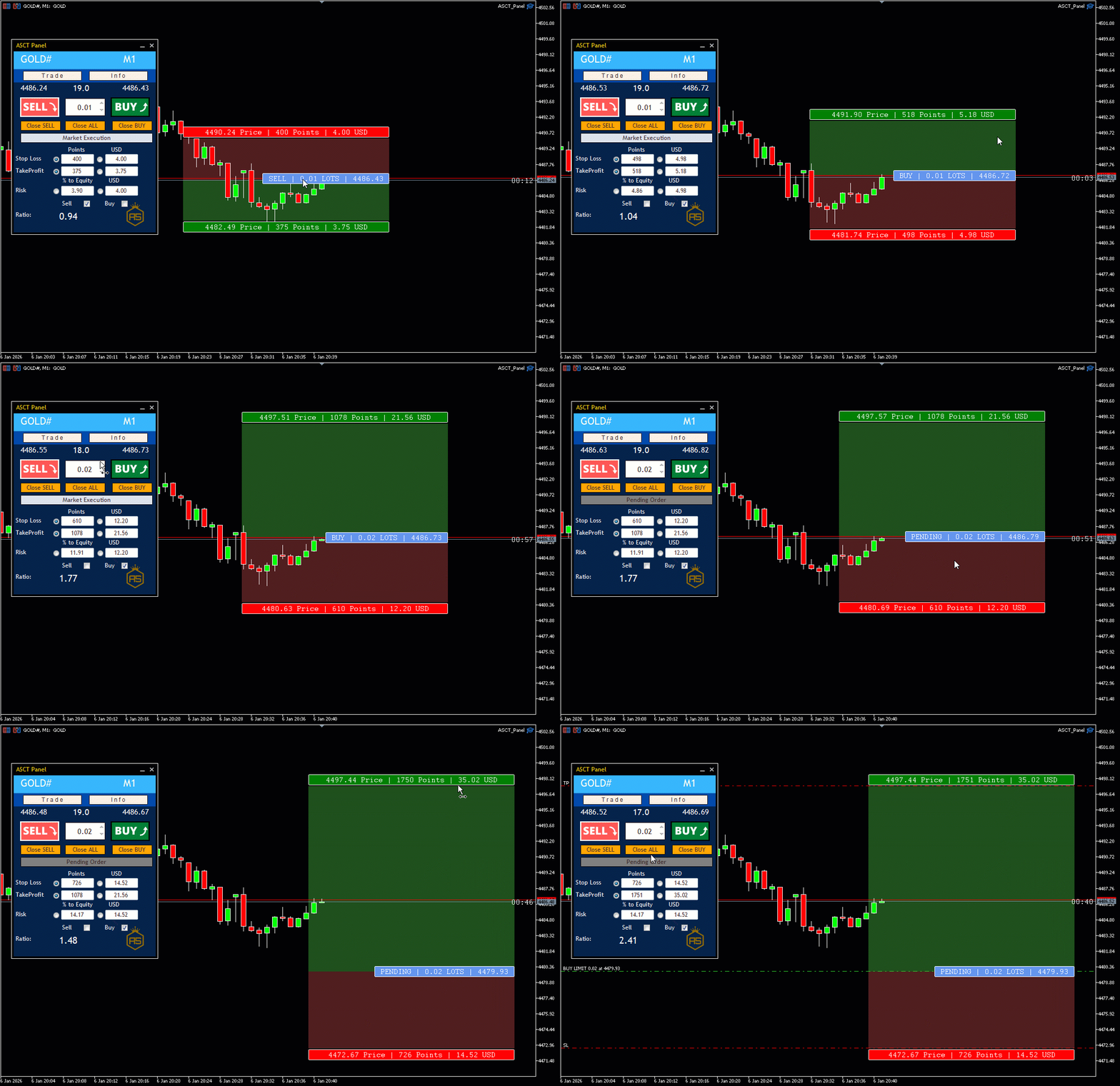
Define the percentage of capital to risk or a fixed USD amount. The panel calculates the exact lot size instantly based on your Stop Loss. Visualize your R:R ratio in real-time as you move the lines.
- Risk by Equity (%)
- Risk by Monetary Value (USD)
- Live R:R Ratio
Visual Drag & Drop Execution
TradingView style: visualize profit (green) and loss (red) zones with professional transparency. Smart labels show price, pips and projected profit. Clean chart on demand with For Buy/For Sell selectors.
- Pro Zone Shading
- Smart Labels
- On-Demand Visualization
Versatile Execution Modes
Market Execution: enter the market with one click with preconfigured SL and TP. Pending Orders: switch to pending mode and move the entry line directly on the chart. The panel automatically detects Buy Limit or Buy Stop.
- Market Execution
- Pending Orders (Limit/Stop)
- Automatic Detection
Break Even & Trailing Stop
Protect profits on open trades: move Stop Loss to Break Even or enable Trailing Stop from the panel, without leaving the chart.
- One-click Break Even
- Trailing Stop
- Open-trade management
ASCT Panel vs Other Managers
Discover why ASCT Panel is the best choice
| Feature | ASCT Panel | Other Managers |
|---|---|---|
| Drag & Drop Visualization | Yes (TradingView Style) | No |
| Automatic Risk Calculation | Yes (By % or USD) | Limited |
| Real-Time R:R Ratio | Yes | No |
| Price | Free with XM / $49.99 Pro | Paid |
Why Choose ASCT Panel?
Zero Lot Size Errors
Calculate your exact risk percentage before entering. The panel calculates the precise lot size in milliseconds based on your Stop Loss distance.
Real-Time R:R Ratio
Dynamically calculates your Risk:Reward ratio as you move your SL and TP lines. Make sure to take only high-value probabilistic trades.
TradingView Experience on MT5
Dynamic Drag & Drop visual lines. Move your Stop Loss and Take Profit lines directly on the chart with pro zone shading.
Emotional Control
Visualize your exact profit and loss in USD on the chart before entering. Process risk logically and emotion-free.
Visualize Your Risk and Profit in Real-Time
Forget manual calculations and slow popup windows. Manage your risk and visualize your profits directly on the chart. The panel shows price, pips and projected profit in USD as you move your Stop Loss and Take Profit lines.
- Automatic lot size calculation based on risk
- SL/TP zone visualization on chart
- Real-time R:R ratio
- Smart labels with price, pips and USD
Check the step-by-step installation guide or message us on Telegram if you have questions activating your panel.
Frequently Asked Questions
Ready to trade with precision?
Activate your panel in less than 2 minutes for free with XM or with the universal Pro License.
The free option requires XM registration with code PANEL. AS Capital Trading may receive compensation from XM for referrals. Trading involves risk of loss.
ASCT Panel MT5
Free on XM (Save $49.99) or Pro